
Technology has completely transformed classrooms, making learning more interactive and enjoyable. Everything about JOINPD revolves around one key purpose — connecting teachers and students in a more engaging way. Pear Deck’s JoinPD platform allows educators to bring their lessons to life by letting students actively participate in real time. Whether you’re a teacher exploring digital tools or a student trying to join a live session, understanding JOINPD helps make your learning experience smooth and fun.
Let’s take a deep dive into what JOINPD is, how it works, and how you can make the most of it in your classroom.
What Is JOINPD and How It Works
JOINPD is a web-based platform powered by Pear Deck, a tool designed to make presentations more interactive and student-friendly. It allows teachers to create engaging lessons and share them with students through a simple access code. The idea is to move away from one-way teaching and give students a chance to participate and respond during lessons.
When a teacher creates a Pear Deck presentation in Google Slides or Microsoft PowerPoint, they can start a session using Pear Deck and generate a Join Code. Students can then visit joinpd.com, enter the code, and instantly join the live class. Teachers can see responses in real time, manage participation, and even collect student feedback.
Also Read


JOINPD is compatible with various devices — desktops, tablets, and smartphones — so students can connect from anywhere. It is widely used by schools that integrate Google Classroom or Microsoft Teams, making it easy for teachers to assign lessons, quizzes, and interactive tasks.
Key Benefits of JOINPD
- Makes lessons interactive and engaging.
- Provides instant feedback to teachers.
- Encourages student participation and understanding.
- Supports remote and in-class learning equally well.
- Works with both Google and Microsoft tools.
How to Join a Pear Deck Session
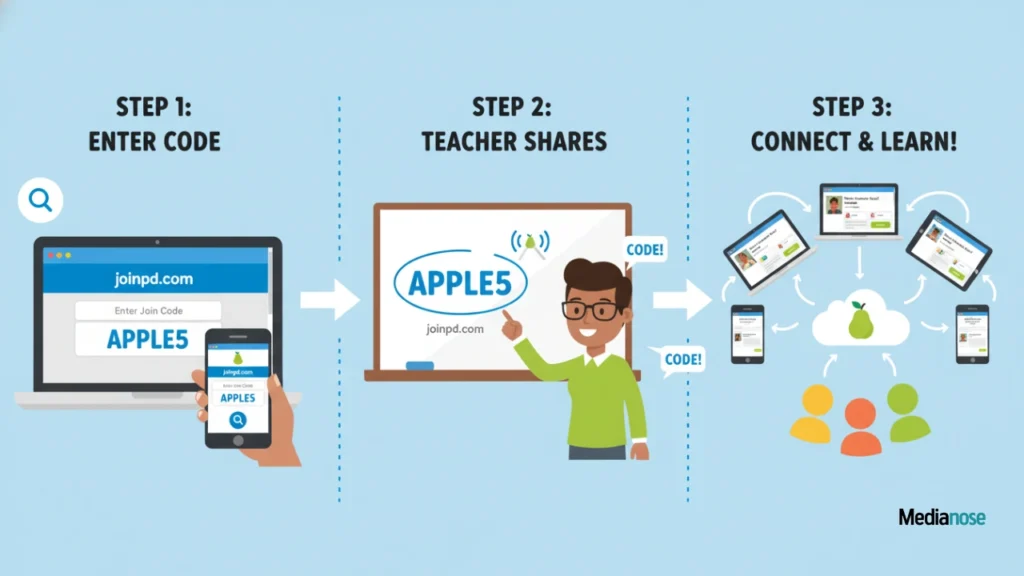
Using JOINPD is incredibly easy. Whether you’re a teacher or a student, the process is simple and only takes a few steps.
For Students
- Open your web browser and go to joinpd.com.
- Enter the five-character code shared by your teacher.
- If prompted, sign in with your school Google or Microsoft account.
- Once connected, you’ll see the live Pear Deck presentation.
- Participate by answering questions, polls, or drawing on slides.
Students don’t need to install any software, making JOINPD accessible for everyone. The sessions can include multiple types of interactive questions — from multiple choice to short text responses.
For Teachers
Teachers can set up a Pear Deck session using these steps:
- Open Google Slides or Microsoft PowerPoint.
- Create or open your lesson.
- Add Pear Deck’s interactive elements through the Pear Deck add-on.
- Click Start Lesson to generate a JoinPD code.
- Share the code with your students to let them join.
Once the session starts, teachers can monitor student responses and even pause slides to discuss answers in real time.
Features That Make JOINPD Stand Out
Pear Deck’s JOINPD isn’t just another classroom tool — it’s a dynamic teaching partner. Let’s explore some of its most powerful features.
Real-Time Interaction
Teachers can see how students are responding instantly. This allows them to understand which concepts are clear and which need more attention.
Anonymous Participation
Students who are shy or nervous about answering in class can respond without fear of embarrassment, promoting confidence and inclusivity.
Custom Question Types
Teachers can create:
- Multiple-choice questions
- Draggable elements
- Drawing or sketch questions
- Short or long answer responses
Integration with Learning Platforms
JOINPD integrates seamlessly with Google Classroom, Canvas, and Microsoft Teams, allowing easy assignment submissions and attendance tracking.
Insights and Data Reports
After each session, teachers can access data reports showing individual and class-level performance. This helps identify learning gaps and plan future lessons more effectively.
JOINPD Teacher Dashboard Overview
The Teacher Dashboard is where educators manage everything. It offers a clean, intuitive interface where you can track responses, provide feedback, and manage sessions efficiently.
Dashboard Features
- Live Student View – See every student’s response in real time.
- Pause & Highlight Tools – Focus on key points by locking responses.
- Post-Session Review – Analyze responses after class for better evaluation.
- Feedback Mode – Offer personal feedback or remarks to individual students.
Here’s a quick comparison table highlighting the dashboard’s main tools:
| Feature | Purpose | Benefit |
|---|---|---|
| Live Responses | See student answers instantly | Real-time understanding |
| Feedback | Send private feedback | Encourages improvement |
| Lock Screens | Pause student activity | Maintain focus |
| Export Reports | Save lesson data | Review and analysis |
JOINPD for Remote Learning

JOINPD became extremely valuable during remote and hybrid learning. Teachers could maintain interactivity even while students joined from home.
By combining voice instruction over video platforms with Pear Deck sessions, teachers ensured students stayed involved. The self-paced mode also allows learners to complete lessons at their own convenience, which is ideal for homework or asynchronous learning.
Why Remote Teachers Love JOINPD
- Easy setup for online classes.
- Students stay connected without distractions.
- Teachers track participation and attendance.
- Self-paced learning fits different schedules.
Tips to Get the Most Out of JOINPD
To make your sessions truly effective, here are a few expert tips.
- Use ice-breaker questions to make the class lively.
- Encourage students to ask questions through interactive slides.
- Combine visuals and polls to keep lessons engaging.
- Use the Teacher Dashboard regularly to spot trends.
- End sessions with reflective questions for deeper understanding.
Common Issues and How to Fix Them
While JOINPD is simple to use, a few common issues can occur. Here are some quick fixes.
| Problem | Possible Cause | Solution |
|---|---|---|
| Can’t join session | Wrong code entered | Double-check the code |
| Slides not loading | Poor internet connection | Refresh or switch networks |
| No student responses | Browser compatibility | Use updated Chrome or Edge |
| Lost session progress | Didn’t sign in properly | Log in with school account |
Teachers can also visit Pear Deck’s Help Center for step-by-step troubleshooting guides.
Why JOINPD Is the Future of Interactive Learning
The traditional classroom model is evolving, and JOINPD is helping lead that change. It turns learning into an active process where students can express ideas and opinions freely. Teachers, on the other hand, gain a better understanding of student needs through instant insights.
This tool promotes collaboration, communication, and critical thinking — three skills essential for modern education. Schools adopting Pear Deck and JOINPD report higher student engagement and improved learning outcomes.
Insights: The Impact of JOINPD
| Metric | Before JOINPD | After JOINPD |
|---|---|---|
| Student Engagement | 65% | 90% |
| Response Accuracy | 70% | 85% |
| Lesson Retention | 60% | 88% |
These numbers show just how powerful interactive teaching tools like JOINPD can be.
Future of JOINPD and Pear Deck Integration
Pear Deck continues to evolve by adding AI-driven feedback, deeper analytics, and expanded integration with LMS platforms. It will likely become a core feature in digital classrooms as schools move toward more personalized learning environments.
Educators can look forward to even smoother sessions, advanced question types, and more creative ways to engage students in upcoming updates.
FAQs
1. What is JOINPD used for?
JOINPD is used for joining live Pear Deck sessions where teachers and students can interact through quizzes, polls, and activities in real time.
2. How do I join a Pear Deck session using JOINPD?
Go to joinpd.com, enter the session code provided by your teacher, and log in with your school email to start participating.
3. Can I use JOINPD without a school account?
Some schools require a Google or Microsoft account for verification, but guest access may be allowed depending on teacher settings.
4. Is JOINPD free for teachers and students?
Pear Deck offers both free and premium plans. The free version includes basic features, while the premium plan unlocks advanced analytics and feedback tools.
5. Can JOINPD be used for remote learning?
Yes, JOINPD works perfectly for remote or hybrid classrooms. Teachers can host sessions online while students join from any device.
Conclusion
Learning through JOINPD is more than just joining a digital classroom — it’s about creating an engaging and collaborative environment where every student has a voice. Pear Deck’s platform makes lessons interactive, encourages participation, and helps teachers understand their students better. As education continues to blend technology with traditional methods, Everything about JOINPD reminds us that learning can be both meaningful and enjoyable. Whether you’re a teacher looking to inspire or a student eager to participate, it offers the perfect bridge between connection and creativity in modern classrooms.